Shipping a React Native App to Both App Stores

Why React Native for a cross-platform app in 2026?
The decision usually comes down to budget, timeline, and team. Native iOS and Android development gives the best performance per platform but doubles the team and the timeline. React Native gives you one codebase, two stores, and a single feature pipeline, at the cost of some platform-specific work for things like media playback and in-app purchase.
I shipped two React Native apps to both stores: AzanGuru (the Quran learning platform, now 100K+ Android installs) and Kaya Music Island (a music streaming app currently mid-rebrand to Ravanova Music). Both decisions to use React Native came down to the same maths: one developer, two stores, sustainable feature velocity.
What does the end-to-end workflow look like?
Six stages:
| Stage | What happens |
|---|---|
| 1. Initial setup | Bootstrap the project, pick managed (Expo) or bare workflow, set up linting and CI |
| 2. Development | Build the app, test on simulators and real devices |
| 3. Store preparation | App icons, screenshots, marketing copy, privacy policy |
| 4. Build for distribution | Configure signing, build release binaries for both stores |
| 5. Submission | Upload to App Store Connect and Google Play Console |
| 6. Post-launch | Monitor crashes, ratings, and reviews; ship updates |
Should you use Expo or the bare workflow?
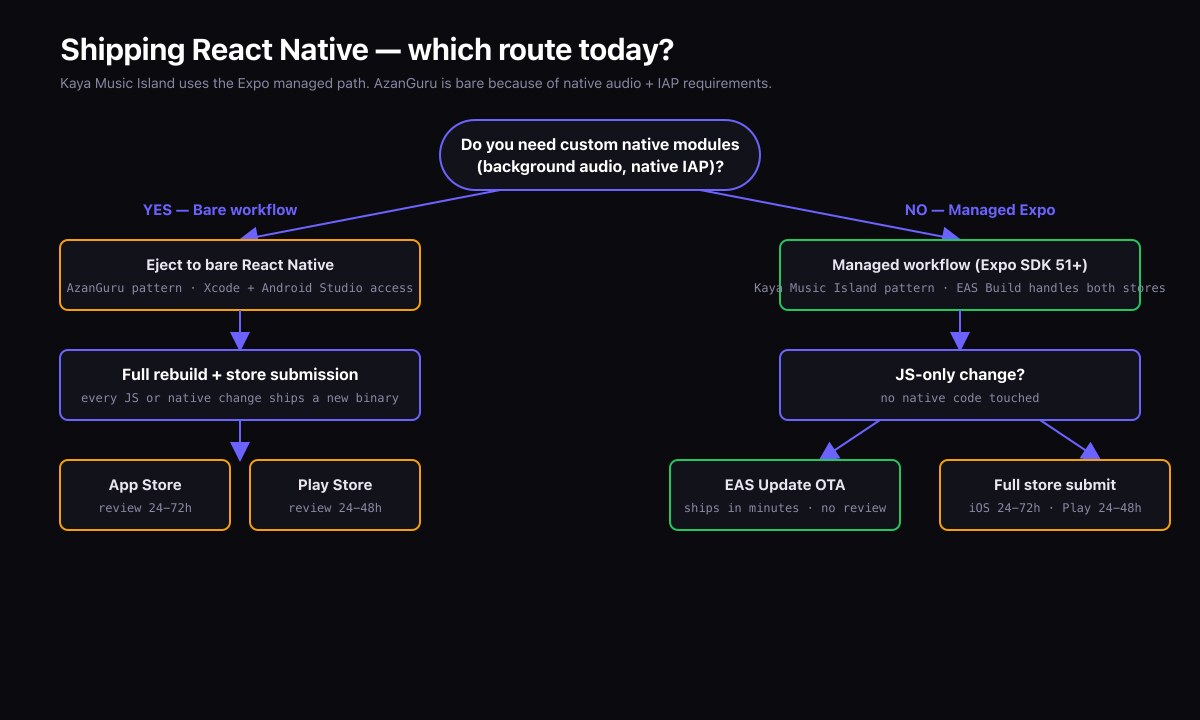
For most new apps in 2026, the answer is Expo with EAS (Expo Application Services). EAS handles the entire build, submission, and update pipeline. You get over-the-air updates, cloud builds, and a managed CI flow without setting up Xcode or Android Studio locally.
Eject to the bare workflow only when you need a native module that is not compatible with Expo's managed runtime. The list of incompatible modules has shrunk dramatically since Expo SDK 49.
Both AzanGuru and Kaya use Expo with a few EAS Build customisations for in-app purchase and audio modules.
How do you set up the project structure?
The structure I deploy on every project:
/src
    /screens        # one folder per screen
    /components     # shared UI components
    /hooks          # custom hooks
    /api            # Apollo Client setup, GraphQL queries
    /navigation     # React Navigation config
    /state          # Zustand or Redux stores
    /utils          # helpers
/assets
    /images
    /fonts
app.json            # Expo config
eas.json            # EAS build profiles
.env.development
.env.staging
.env.production
Three EAS build profiles: development (for the development client), preview (for internal QA), and production (for store submission).
How do you handle in-app purchase?
Use expo-in-app-purchases on Expo, or react-native-iap on bare workflow. The mechanics on iOS and Android are different (StoreKit vs Google Play Billing) but both libraries provide a unified API.
What the documentation does not say loudly enough:
- Test on real devices. Simulators do not support in-app purchase flows fully.
- Tax setup in App Store Connect and Google Play must be complete before products show up. Allow time for this.
- Server-side receipt verification is mandatory. Never trust the client.
How do you prepare store assets?
The minimum set per platform:
- App icon, 1024×1024 PNG (iOS) and a feature graphic 1024×500 (Google Play).
- Screenshots in the required sizes per device class. iOS in 2026 requires iPhone 6.7" and 5.5" sizes; iPad sizes are optional but recommended.
- App preview videos are optional but lift conversion meaningfully.
- App description, keywords, and category.
- Privacy policy URL.
- Support URL.
For AzanGuru we used the same set of base assets and adapted them for each store. Apple is stricter about device-frame mockups; Google Play accepts more variety.
What is the privacy disclosure process?
Both stores ask for a privacy disclosure: what data the app collects, why, and whether it is shared with third parties. Apple's App Privacy questionnaire is more granular than Google Play's Data Safety form.
The mistake to avoid: undeclared analytics SDKs. If you include Firebase Analytics, Mixpanel, or any analytics SDK, you must declare it. Apps have been rejected — and apps have been pulled — for undeclared data collection.
On both AzanGuru and Kaya the disclosures are minimal. Both apps log in WordPress users and store account data; neither sells data to third parties.
How do you submit?
With EAS, submission is a single command:
eas submit --platform ios --profile production
eas submit --platform android --profile production
EAS handles the build upload to App Store Connect or Google Play Internal Track. You finish the store-side submission in the App Store Connect or Google Play web UI: complete the metadata, attach the build, submit for review.
Review times in 2026 are typically:
- Apple: 24-72 hours for most apps.
- Google Play: a few hours for an existing app, up to seven days for a first submission of a new account.
How do you handle updates?
Two channels:
- JavaScript-only updates via EAS Update. These ship instantly to the user's app without going through review, as long as the native binary did not change.
- Full binary updates when you upgrade the React Native version, add a native module, or change permissions. These go through store review again.
EAS Update is the difference between a six-hour fix and a six-day fix when a bug ships to production. Use it carefully — Apple's guidelines limit what JavaScript-only updates can do, especially around payments — but use it.
What about analytics and crash reporting?
Two essentials:
- Crash reporting via Sentry or Bugsnag. Free tiers cover both apps comfortably.
- Funnel analytics via PostHog, Mixpanel, or Amplitude. Even basic event tracking on key flows (signup, lesson start, lesson complete) reveals where users drop.
Both must be declared in the App Privacy disclosure.
What I learned from shipping AzanGuru and Kaya
- Store metadata is half the work. Engineering a great app and shipping it badly to the stores produces few installs.
- Real-device testing is non-negotiable. Simulators miss real performance issues, especially around media playback and in-app purchase.
- Rebrand is harder than launch. Migrating Kaya Music Island to Ravanova Music — keeping installs intact, updating store metadata, coordinating the iOS rename through Apple review — took more careful planning than the original launch.
Frequently asked questions
How long does a first-time submission take?
From "binary uploaded" to "live in store": 1-7 days. From "let's build this app" to "binary uploaded": several weeks to several months depending on scope.
What does EAS cost?
The free tier covers small projects. Production builds at scale cost about USD 20-100/month per project depending on build frequency.
Should I publish to both stores or pick one?
Publish to both. The marginal cost is small and the marginal user base is large, especially in markets where Android dominates.
Also read
- Case study: AzanGuru
- Case study: Kaya Music Island / Ravanova Music
- Rebranding a Live React Native App: Kaya to Ravanova
Need a mobile app shipped?
If you have a React Native project that needs to land on the App Store and Google Play with a clean release process, get in touch.