Rebranding a Live React Native App: Kaya to Ravanova

Why rebrand a live app?
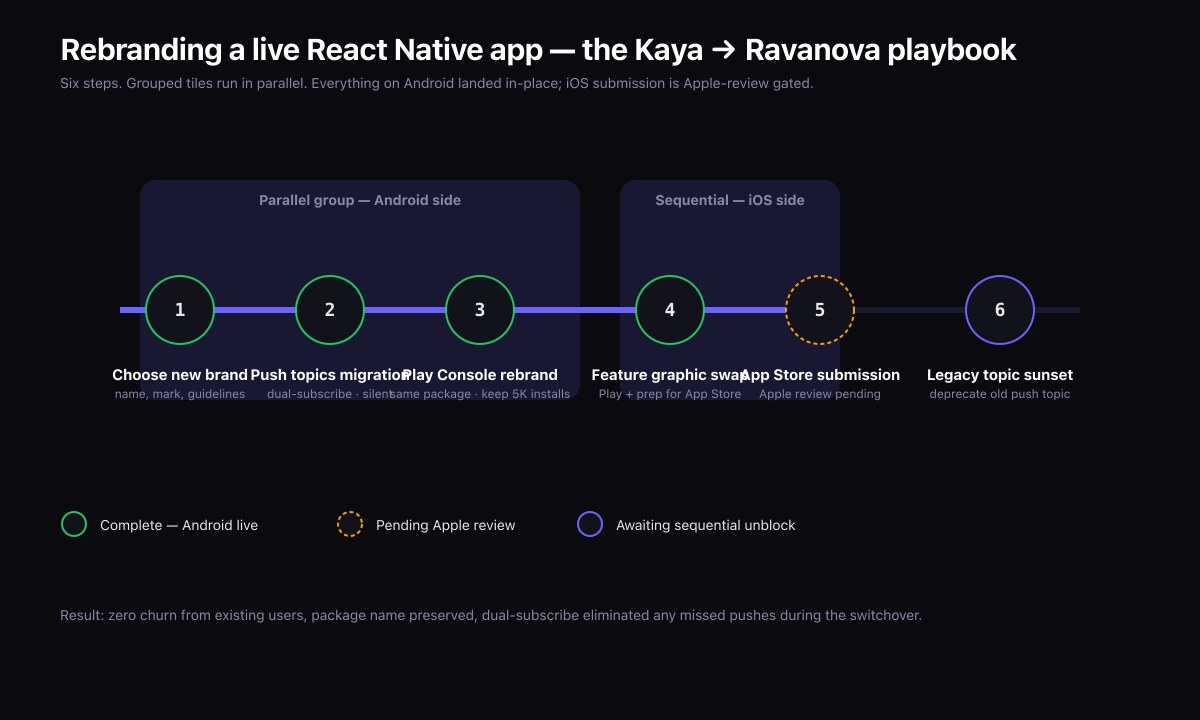
Brands change. Sometimes the name no longer fits the product the team has built. Sometimes the original name is too narrow, too regional, or trademarked elsewhere. Sometimes the team has a clearer story to tell and the name needs to reflect it.
Kaya Music Island launched on iOS and Android in 2025 as a video-first music streaming and creator-discovery app. As the platform evolved, the team chose to rebrand to Ravanova Music — a name that better reflects the broader vision. The Android side is live under the new name. The iOS rename is in Apple review at the time of writing.
This article walks through the actual rebrand playbook for a React Native app on both stores. The mechanics are different on each platform, and the order matters.
What does "rebrand" actually involve?
At least nine moving parts:
- App name in the store listing
- App icon (often, though not always)
- Feature graphic and screenshots
- Store description and keywords
- Push notification topics and identifiers
- Deep link domains and universal link associations
- Privacy policy URL, support URL, marketing URL
- In-app branding (logo, splash screen, accent colour, strings)
- Backend identifiers that may surface in user-visible places (e.g. emails sent to users)
Get any of those wrong and the rebrand looks half-finished. Worse, you risk losing existing installs if the underlying app identifier changes.
The non-negotiable rule: preserve the app identifier
On both stores, the underlying identifier of the app must stay the same. On Android that is the package name (e.g. com.islandmusicstream.kaya). On iOS that is the bundle ID. If you change either, the existing installs become a different app from the store's point of view — users would need to uninstall and reinstall, losing accounts and data.
For Kaya the Android package remains com.islandmusicstream.kaya even though the displayed name is now Ravanova Music. That is how 5K+ existing installs stayed intact through the rebrand.
How does the Android rebrand work?
Google Play makes the rebrand reasonably straightforward:
- In Google Play Console, edit the app name. Updates propagate within an hour.
- Replace the icon, feature graphic, and screenshots.
- Update the short description, full description, and tags.
- Ship a new APK or AAB with the updated displayed app name (set in
app.jsonfor Expo, or the AndroidManifest for bare React Native). - Update the in-app branding: logo, splash screen, strings.
No re-review beyond standard release review. The package name stays the same. Existing users get the new name on next sync.
How does the iOS rebrand work?
iOS is more conservative:
- App Store Connect's app name change is subject to Apple's regular review. You cannot rename the listing in an arbitrary way; the new name must comply with App Store guidelines (no keyword stuffing, no trademark violations).
- You submit a new binary with the new
CFBundleDisplayName. The bundle ID stays the same. - You update screenshots, marketing copy, keywords, and the app icon (if changing).
- Submit for review.
Apple review can take 24-72 hours. During that time the old listing is still live with the old name.
On Kaya we submitted the rename to Ravanova Music under the existing iOS bundle ID. As I write, the submission is in review. Existing iOS users will see the new name on their device's home screen and in the App Store after the update propagates.
| Aspect | Android | iOS |
|---|---|---|
| Identifier preserved | Package name (e.g. com.islandmusicstream.kaya) | Bundle ID |
| Rename process | Edit app name in Play Console; propagates within an hour | Subject to Apple's regular app review |
| Review | No re-review beyond standard release review | Apple review, 24-72 hours |
| New binary required | Yes — new APK/AAB with updated displayed name | Yes — new binary with new CFBundleDisplayName |
What about push notifications and deep links?
Two sources of subtle breakage on a rebrand:
Push topics. Many apps subscribe users to topics in Firebase Cloud Messaging or APNS based on the brand name. If you simply rename a topic, existing subscribers are lost. The correct migration:
- Create the new-name topic.
- Push an in-app silent migration that resubscribes all existing devices to the new topic, then unsubscribes them from the old one.
- Stop publishing to the old topic.
Deep links and universal links. If marketing pages live at kaya.app and the new brand domain is ravanova.app, both domains need to be associated with the iOS Universal Links file and the Android intent filters. Run them in parallel during the migration, then redirect the old domain to the new.
How do you handle the in-app branding swap?
The natural inclination is to swap the logo, splash, and strings all at once. That is the right call only if the rebrand is final and committed. If there is any chance of rolling back, decouple:
- Logo and accent colour can be remote-configurable from the backend, so the rebrand toggles on without an app update.
- App icon and store metadata require an app update, so those happen together.
On Kaya we shipped the new in-app branding in a release tied to the rebrand. The flexibility was not needed; the team was committed.
What about the backend identifiers?
If the backend sends transactional emails ("Welcome to Kaya Music Island"), those strings need to update at the same time as the app branding. Otherwise users see Ravanova Music in the app and Kaya in the welcome email.
On Kaya the backend is a small REST API. The string changes were a single deploy. On larger backends, audit every customer-facing string before flipping the switch.
How do you communicate the rebrand to existing users?
Three channels work:
- An in-app banner on first launch after the update, explaining the new name and reassuring users that the app is the same.
- A push notification to active users, framed as good news.
- An update to the store description that explains the rebrand prominently.
The most important thing is reassurance: users panic when an app's name changes unexpectedly. Make it clear that nothing is broken and nothing was lost.
What I learned doing it on Kaya
- Plan for the iOS rename being in review when you flip the Android side. The mismatch period is unavoidable.
- Document the package and bundle IDs in writing before anyone touches the stores. Mistakes here are not recoverable.
- Coordinate marketing and engineering on the same timeline. Half-rebranded touchpoints damage trust more than a delayed rebrand.
Frequently asked questions
Will I lose installs?
No, as long as you preserve the package and bundle IDs. The visible name changes; the underlying app is the same.
How long does the full rebrand take?
For a focused team, two to four weeks. The bottleneck is usually Apple review, marketing collateral, and in-app branding QA.
Can I rebrand without a new app version?
On Android, store metadata can change without a new APK. On iOS, the displayed name lives in the app binary, so you need a new build to change it.
Also read
- Case study: Kaya Music Island / Ravanova Music
- Shipping a React Native App to Both App Stores
- Building a Quran App: What 100K+ Installs Taught Me
Planning a rebrand?
If you have a live mobile app that needs to change name without losing users, get in touch. I have just run this exact migration.