WordPress on VPS: A 99% Uptime Stack with Nginx

Why VPS instead of shared or managed hosting?
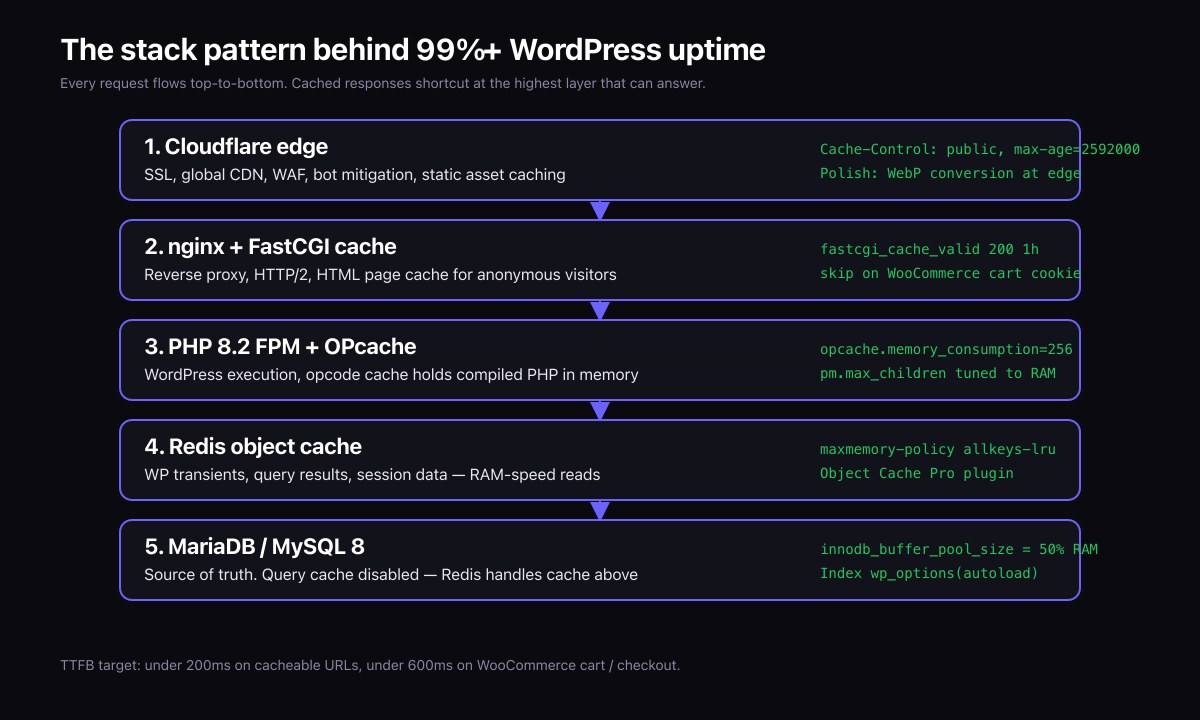
Shared hosting puts your WordPress site on a machine with hundreds of other tenants competing for CPU, memory, and disk I/O. Managed WordPress hosting like Kinsta or WP Engine fixes most of that for a premium price. A VPS sits between the two: lower monthly cost than managed hosting, complete control over the stack, predictable performance because you are the only tenant of the slice you are paying for.
I run this stack on the Fine Luxury Property platform and have set up versions of it for dozens of client sites at Inspiry Themes and SymoGlobal. The targets are uncompromising: 99%+ uptime, TTFB under 200ms on cacheable URLs, no surprise outages.
Which VPS provider should you choose?
Three providers cover most needs:
| Provider | Notes |
|---|---|
| Hetzner Cloud | Best price-to-performance ratio. European data centres. About USD 5-15/month for 4GB RAM and dedicated CPU cores — enough for a real WordPress site under decent load. |
| DigitalOcean | Slightly more expensive than Hetzner. Better global region coverage. Excellent documentation and a mature tutorial ecosystem. |
| Vultr | Comparable to DigitalOcean. Strong network performance. Useful if you need a region DigitalOcean does not cover. |
Avoid AWS EC2 unless you have a reason. EC2 is fine technically but the pricing model is a tax on small teams. For a single WordPress site you will pay more and get nothing extra.
The operating system: Ubuntu LTS
Ubuntu 24.04 LTS is the right default in 2026. Five years of security updates from Canonical, broad community support, and packages for everything in the rest of this stack.
First-hour setup:
- Create a non-root user with sudo access. Disable root SSH login.
- Install
ufw, allow only ports 22, 80, and 443. - Install
fail2banwith default jails for SSH and (later) nginx. - Configure unattended security upgrades via
unattended-upgrades. - Install
htop,iotop, andtmuxfor routine ops.
The full SSH and firewall hardening is worth doing properly. A weak SSH config is the most common reason WordPress sites get compromised, more common than any WordPress-level vulnerability.
Web server: nginx in front of PHP-FPM
Apache is fine for development. nginx is the right answer in production because it serves static files faster, handles concurrent connections with much lower memory, and integrates cleanly with FastCGI caching.
Install nginx from the official repository (not the Ubuntu default — it is older). Configure one server block per site, with HTTP/2 and modern TLS ciphers. Add a FastCGI cache zone in nginx.conf for cacheable URLs.
The cache rule that does the most work:
fastcgi_cache_bypass $http_x_wp_cache_bypass $http_cache_control;
fastcgi_no_cache $http_x_wp_cache_bypass $http_cache_control;
And in each location ~ \.php$ block, add a cache key tied to the request URI and skip caching for logged-in users, the WordPress admin, search, and POST requests.
PHP 8.2 or 8.3 with OPcache
PHP 8.2 is the current LTS-style release with the longest support runway in 2026. PHP 8.3 brings performance improvements that matter on busy sites. Either is fine; pick 8.2 unless you have a specific 8.3 reason.
OPcache settings that matter:
opcache.memory_consumption=256(or higher on big plugin loads)opcache.max_accelerated_files=20000opcache.validate_timestamps=0in production, with a deploy hook that callsopcache_reset()opcache.preloadfor hot files on PHP 8.x — measurable boost on bigger codebases
MySQL/MariaDB tuning
MariaDB 10.11 is the right default in 2026 unless you need MySQL 8-specific features. The single most important setting is the InnoDB buffer pool size. Aim to size it to the working set of your data: typically 50-70% of available RAM on a dedicated database VPS, less on a single-box LEMP stack.
Set innodb_flush_log_at_trx_commit=1 for safety, innodb_io_capacity to match the underlying disk's IOPS budget, and slow_query_log=1 with a 1-second threshold so you can catch slow queries before they become customer-visible.
Redis object cache
Install Redis from the official repository. Configure it to listen only on the loopback interface unless you are running a multi-server setup. Set maxmemory to a fraction of RAM (1GB is usually plenty for a single-site object cache) with maxmemory-policy=allkeys-lru.
On the WordPress side install the Redis Object Cache plugin (free, well-maintained). Object Cache Pro is a paid alternative with better replication support and dashboard tooling; it is worth the money on busy stores.
SSL: Let's Encrypt with auto-renewal
Use certbot with the nginx plugin. Auto-renewal is handled by a systemd timer that ships with the Ubuntu package. Test renewal once with certbot renew --dry-run and you are done.
In nginx, enforce HTTP/2, modern TLS (1.2 and 1.3), and add HSTS once you are confident SSL is set up correctly.
Cloudflare in front
Cloudflare's free tier covers most small-to-medium sites and gives you edge caching for static assets, DDoS mitigation, and a real CDN. Pro tier adds image polish and better page rules.
Always do:
- Set the SSL mode to Full (Strict) — Cloudflare-to-origin TLS using your Let's Encrypt cert.
- Add a page rule that caches everything for
/wp-content/uploads/*. - Add a page rule that bypasses cache for
/wp-admin/*and/wp-login.php.
Backups
Two-tier backup strategy:
- Daily file and database snapshot stored on a different cloud (BackBlaze B2 or Wasabi). Use
borgorresticfor deduplicated encrypted backups. - Weekly snapshot of the entire VPS via the hosting provider's snapshot feature. This is the disaster-recovery option that lets you roll the whole machine back.
Test the restore process at least once after setting it up. A backup that has never been restored is not a backup.
Monitoring and alerting
Uptime monitoring is the bare minimum. Use Better Stack or UptimeRobot to ping the site every minute from multiple regions. Add an alert channel that wakes you up if it matters.
For more depth: Netdata (free, single-server install, beautiful dashboards) or Prometheus + Grafana if you are running multiple servers and have time to invest in the stack.
What does the finished stack actually deliver?
On Fine Luxury Property I run a variant of exactly this stack. The platform handles luxury property listings across nine countries, runs custom daily import pipelines, and has held 99%+ uptime since I took over the technical architecture in 2023. TTFB on cacheable URLs is consistently under 200ms. Core Web Vitals are green on every page template.
The cost of the underlying infrastructure is roughly USD 30 per month at this scale. Replacement managed hosting at comparable performance would run several hundred per month. The savings compound and the control is incomparable.
Frequently asked questions
How long does it take to set up?
A first-time build runs 4-6 hours if you are competent at the command line. Subsequent builds, with provisioning scripts, run in 30-60 minutes.
Do I need to know Linux?
Yes. If you are uncomfortable with the command line, a managed WordPress host is a better fit. The trade-off you are buying is convenience for cost.
What about security?
The hardening above (no root SSH, ufw, fail2ban, unattended upgrades, modern TLS) covers the common attack surface. Add a WordPress security plugin like Wordfence or Solid Security for application-level protection, and audit your plugin list quarterly.
Also read
- Core Web Vitals Optimization for WooCommerce
- How to Fix a Slow WordPress Site: A Real Case Study
- Case study: Fine Luxury Property platform
Need a VPS setup for your WordPress site?
I provision this stack for clients regularly. If you are moving off shared or managed hosting, get in touch with your current setup and traffic profile and I can quote the migration.