Core Web Vitals Optimization for WooCommerce

Why WooCommerce stores struggle with Core Web Vitals
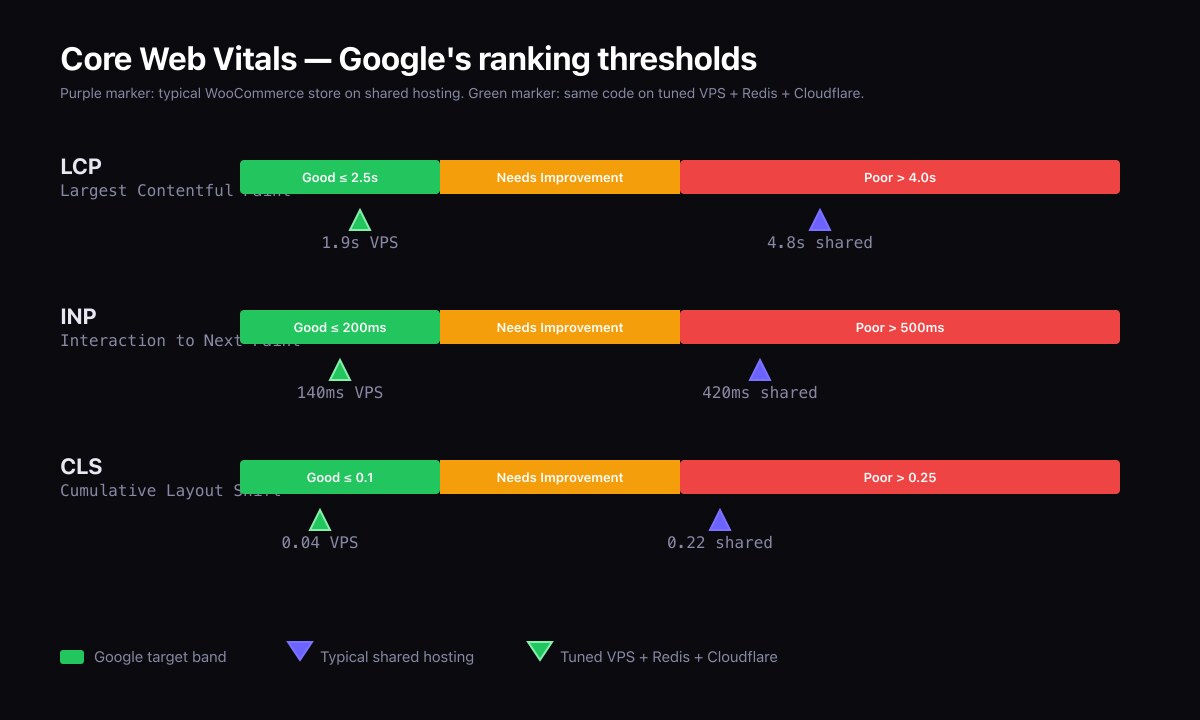
WooCommerce is the most popular e-commerce platform on the web. It is also one of the slowest if left on default settings. The reason is structural: WooCommerce extends WordPress with thousands of additional database rows per product, dozens of new database tables, and an admin UI that runs heavy queries on every product save. Multiply that by 10,000 products and you have a database that takes seconds to answer the simplest query.
The good news is that all of WooCommerce's performance problems have known fixes. The process below is the one I follow on every WooCommerce build, including the kind of multi-thousand-product stores I worked on at Inspiry Themes.
What are the Core Web Vitals and why does Google rank on them?
Google ranks pages on three measured experiences:
| Metric | What it measures | Target |
|---|---|---|
| Largest Contentful Paint (LCP) | How quickly the biggest visible element renders | Under 2.5 seconds |
| Interaction to Next Paint (INP) | How responsive the page feels when the user interacts. Replaced First Input Delay as the official metric in 2024. | Under 200ms |
| Cumulative Layout Shift (CLS) | How much the page jumps around while loading | Under 0.1 |
Google measures real-user data via the Chrome User Experience Report (CrUX), as defined in the official Core Web Vitals reference, and rolls those measurements into ranking signals on a 28-day window. Improving Core Web Vitals is one of the highest-leverage SEO actions you can take, because every page on the site benefits at once.
How do you measure WooCommerce performance before optimizing?
Measurement first, optimization second. Without baselines you cannot tell whether changes worked.
The five-tool stack:
- PageSpeed Insights for both lab and field (CrUX) data.
- WebPageTest for waterfall analysis from specific locations and connection profiles.
- Query Monitor for slow queries, duplicate queries, and per-plugin query budgets.
- New Relic or Tideways for production application performance monitoring on bigger stores.
- Chrome DevTools Performance panel for JavaScript main-thread work that affects INP.
Server stack: the foundation
I deploy the same stack pattern on every serious WooCommerce site. The shape is the one I run for the Fine Luxury Property platform and the one we used on the RealHomes Modern customer support sites at Inspiry Themes.
- VPS. Hetzner, DigitalOcean, or Vultr. Avoid shared hosting for stores with traffic.
- nginx as the web server, with FastCGI caching for cacheable URLs.
- PHP 8.2 or 8.3 FPM with OPcache properly tuned.
- MariaDB or MySQL 8 with the query cache disabled and InnoDB buffer pool sized to the working set.
- Redis as the WordPress object cache (via the Object Cache Pro or the free Redis Object Cache plugin).
- Cloudflare in front for SSL, edge caching of static assets, and bot mitigation.
This combination reliably hits Time to First Byte under 200ms on cacheable URLs and under 600ms on uncached cart and checkout flows. That headroom is what makes the rest of the optimizations meaningful.
Database tuning for WooCommerce
WooCommerce stores in wp_postmeta, wp_termmeta, and a set of WooCommerce-specific tables like wp_wc_orders (since WooCommerce moved to high-performance order storage). On stores with significant order history these tables grow large quickly.
Always do:
- Enable High-Performance Order Storage (HPOS) in WooCommerce settings. This is the default for new installs since WooCommerce 8.x and dramatically faster than legacy post-based order storage.
- Add an index on
wp_postmeta(meta_key)if it is not already present. - Add an index on
wp_options(autoload)— improves every WordPress request. - Schedule a weekly cron that clears expired transients, removes old action scheduler logs, and trims order notes older than the retention policy.
- Use the WP-CLI
wp transient delete --allandwp action-scheduler logs purgecommands during maintenance.
Image pipeline: the biggest LCP win
Product images are usually the LCP element on a category and product page. They are also the largest single source of payload.
The pipeline:
- Generate WebP (or AVIF) variants for every uploaded image. WordPress 6.5+ supports AVIF in core; WebP has been supported since 5.8.
- Serve responsive images with
srcsetandsizesso phones do not download desktop assets. - Set
fetchpriority="high"on the hero image (the LCP candidate) andloading="lazy"on every below-the-fold image. - Declare
widthandheighton everyimg. Without those attributes the browser cannot reserve space and CLS spikes. - Serve images from a CDN. Cloudflare Polish or Bunny.net Image Processing both work; both auto-WebP based on the request
Acceptheader.
On this very portfolio I converted six 640×640 project PNGs to WebP at quality 85. Combined file size dropped from ~3.1MB to ~220KB. That kind of reduction is typical, and on a category page with 24 product thumbnails the impact is enormous.
JavaScript: keep the main thread free
INP is the new gatekeeper. INP measures the worst delay between the user tapping anything and the next frame painting. WooCommerce is responsive on a clean stack, but most stores load 5-10MB of third-party JavaScript that blocks the main thread.
The fixes that move INP the most:
- Defer or async every non-critical script.
- Audit third-party tags. Google Tag Manager often loads dozens of trackers; trim to what is actually used.
- Move heavy work off the main thread with
requestIdleCallbackor workers where possible. - Replace heavy WooCommerce extensions that load JavaScript on every page with lighter alternatives.
Caching strategy
Three layers, in this order:
- Edge cache at Cloudflare for static assets and cacheable HTML (homepage, category pages, blog posts).
- Page cache at the origin (nginx FastCGI) for HTML that Cloudflare cannot cache because it is personalized.
- Object cache in Redis for the database. Critical for WooCommerce because the same product or cart object can be queried dozens of times per page render.
Cart, checkout, and account pages must bypass page caches. The standard cache exception headers are well documented in the FastCGI nginx recipes; copy them verbatim and test.
What results does this stack deliver?
On the Fine Luxury Property platform, this exact optimization pattern delivered a 50%+ improvement in measured Core Web Vitals over the previous setup, with no design changes. On the RealHomes Modern installs I supported at Inspiry Themes, the same stack let support teams confidently quote sub-2-second LCP to customers on properly hosted environments.
On the portfolio you are reading right now, the WebP and width-height sweep alone cut the home-page CLS to under 0.05 and lifted the mobile PageSpeed score on the project pages.
Frequently asked questions
How much does WooCommerce optimization usually cost?
A full audit and rebuild for a 1,000-product store typically runs USD 2,500-5,000 in 2026 with a senior WordPress developer. Larger stores scale upward with the number of templates and integrations.
Does this work for Shopify too?
The principles transfer. Shopify is closer-source so you have less control over the server, but the image pipeline, JavaScript discipline, and caching headers all apply.
What is the single highest-impact change?
Move off shared hosting onto a tuned VPS. Nothing else matches the cumulative effect, because every other optimization compounds on the server foundation.
Also read
- How to Fix a Slow WordPress Site: A Real Case Study
- WordPress on VPS: A 99% Uptime Stack with Nginx
- Case study: Fine Luxury Property platform
Need a WooCommerce performance audit?
If your store is slow and conversion is suffering, I can audit the full stack and produce a prioritized optimization plan. Get in touch with the URL and current PageSpeed score.