Building a Property Import Pipeline for WordPress

Why property portals need a real import pipeline
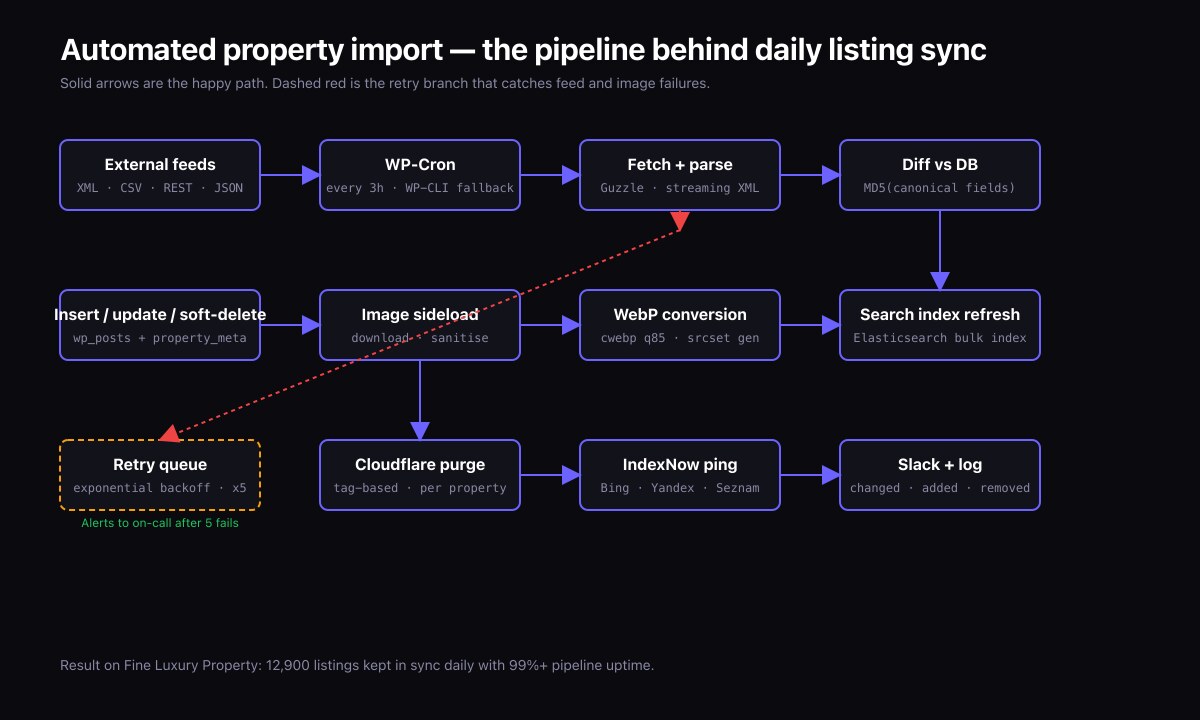
A serious real estate site does not have its agents log in and type listings into the WordPress admin. Listings come from a data source: a portal like Rightmove or Zillow, an MLS feed, a partner CRM, or a series of bulk supplier feeds. The pipeline that pulls those feeds in, normalizes them, and creates or updates WordPress posts is the load-bearing component of the whole product.
I run a pipeline of this kind on the Fine Luxury Property platform. It pulls luxury property listings across Portugal, Spain, Mauritius, Dubai, Thailand, France, Cyprus, Croatia, and more, and keeps them in sync daily. The architecture below is the one I would deploy again on any property build.
How is a property import pipeline structured?
Five stages, in order:
| Stage | What happens |
|---|---|
| 1. Fetch | Pull the raw feed from each source — XML, JSON, CSV, or a partner REST API. |
| 2. Parse | Convert the raw payload into a normalized internal record shape. |
| 3. Diff | Compare the incoming record against what's already in WordPress — new, updated, or unchanged? |
| 4. Upsert | Create new posts, update changed posts, mark removed posts as draft or trash. |
| 5. Media | Pull listing images, optimize them, and attach to posts. |
Each stage has its own failure modes and its own retry strategy. The architecture below treats them as separate concerns.
Stage 1 — Fetch
Use wp_remote_get() with a long timeout for big feeds, or stream large XML directly via curl_init() and curl_setopt(CURLOPT_WRITEFUNCTION). Streaming is essential when a feed is hundreds of megabytes — loading it into memory is not viable on most VPS sizes.
Always:
- Store the raw response on disk first. That gives a replayable artifact when something goes wrong downstream.
- Sign or version the stored file with the timestamp and source ID.
- Track ETags or Last-Modified headers so subsequent runs can short-circuit on unchanged feeds.
Stage 2 — Parse and normalize
Every property feed is in a different schema. Build a normalizer per source that converts the source schema into a single canonical record:
$property = [
    'source_id'      => 'rightmove:12345',
    'title'          => '...',
    'description'    => '...',
    'price_amount'   => 1250000,
    'price_currency' => 'EUR',
    'bedrooms'       => 4,
    'bathrooms'      => 3,
    'area_sqm'       => 220,
    'lat'            => 38.7223,
    'lng'            => -9.1393,
    'country'        => 'PT',
    'images'         => [ 'https://feed/img1.jpg', ... ],
    'features'       => [ 'pool', 'sea_view' ],
    'agent'          => [ 'name' => '...', 'email' => '...' ],
];
One normalizer per source. Each one is small. The downstream stages do not care which source the property came from once normalization is done.
Stage 3 — Diff
For each incoming record, look up the existing WordPress post by source_id stored in post meta. Compare a hash of the normalized record against the hash stored on the previous import. If the hash matches, skip — no changes. If the hash differs, update. If the post does not exist, create.
The hash strategy is the secret to making this efficient at scale. Without it, every nightly import would re-write every post, churning the database and burning postmeta writes that the site does not need.
Stage 4 — Upsert into WordPress
Use wp_insert_post() for new properties and wp_update_post() for changes. Store the structured fields as post meta. The location (lat/lng) goes into both post meta and a custom geospatial index if you have one (PostGIS, Algolia, or a custom MySQL spatial index).
For removals, decide a policy: properties that disappear from the feed for N days move from "published" to "draft" with a flag, and after another period are trashed entirely. Hard deletion is dangerous because feed sources sometimes drop and restore listings; a soft-delete window protects you.
Stage 5 — Media pipeline
Property feeds typically include large image URLs. The naive approach — download each into the WordPress media library on every import — is slow, wasteful, and floods the disk with duplicates.
The pattern I use on Fine Luxury Property:
- Download each image once and store it in a structured path under
wp-content/uploads/properties/{property_id}/{n}.{ext}. - Generate WebP variants at WordPress thumbnail sizes during the import.
- Attach the image as a WordPress attachment post tied to the property post.
- Hash the image bytes; if the same hash appears for a property on a subsequent import, skip — no re-download.
For sites with hundreds of thousands of images, push the actual binaries to S3 or a cheaper object store and serve via CloudFront or Cloudflare R2. The WordPress attachment then references the CDN URL.
How do you run the pipeline reliably?
Three considerations:
- Scheduling. WP-Cron is fine for hourly small jobs, terrible for hour-long imports. Use real Linux cron calling WP-CLI:
wp evaluator:run-import --source=rightmove. - Concurrency. Use a file lock so two import processes cannot run at once for the same source.
flockin bash, or a database row lock. - Logging. Every run produces a structured log: source, start time, end time, fetched count, created count, updated count, skipped count, failed count. Persist these to a custom log table so you can spot regressions.
How do you debug feed problems?
Three habits I rely on:
- The raw payload from stage 1 is always replayable. If a parse error occurs, I can re-run the parser against the saved payload locally without touching production.
- The hash + log table tells me exactly which properties changed in any given run, going back as far as the retention policy allows.
- Every WordPress post has a
source_idmeta field. From any admin screen I can search by source ID and find the import history.
What does this cost to operate?
On a single VPS with the stack from my earlier VPS article, the daily Fine Luxury Property import currently processes thousands of listings across nine countries in under 20 minutes. Memory peaks under 256MB. Disk I/O is the bottleneck, not CPU. The whole operation costs the same as the VPS itself — there is no separate import-processing infrastructure.
Frequently asked questions
Should I use WP All Import?
WP All Import is fine for one-off imports and small recurring jobs. For an active multi-source pipeline that the business depends on, custom code is more reliable and easier to maintain.
What about deduplication across sources?
If two sources list the same property, the diff stage needs a deduplication step. Match on lat/lng within a small radius plus title similarity, then prefer the source with the better data quality. This is hard to get right; budget time for it.
How do I handle currency conversion?
Store prices in the source currency. Convert to the user's preferred currency at render time using a cached exchange rate. The mistake to avoid is converting at import time — exchange rates change, listings do not.
Also read
- How to Fix a Slow WordPress Site: A Real Case Study
- Case study: Fine Luxury Property
- WordPress on VPS: A 99% Uptime Stack with Nginx
- Core Web Vitals Optimization for WooCommerce
Need a property import pipeline?
If your real estate site needs a daily automated feed integration, I have shipped exactly this kind of system. Get in touch with your feed sources and update frequency and we can scope.